
useContext
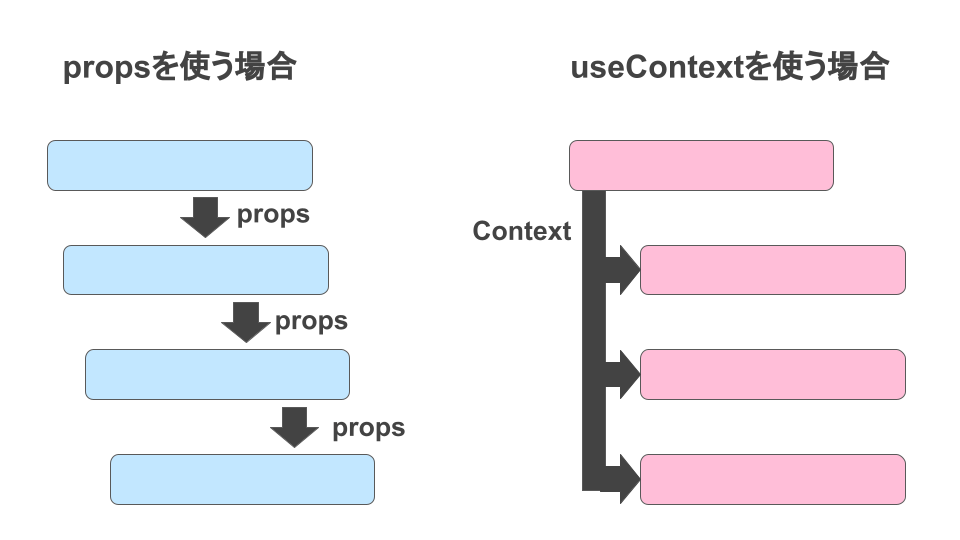
useContext 提供了一个无需为每层组件手动添加 props,就能在组件树间进行数据传递的方法。设计的目的就是解决组件树间数据传递的问题。
语法
tsx
import { useContext } from 'react';

function MyComponent() {
  const theme = useContext(ThemeContext);
  // ...
参数
someContext:先用createContext创建的context。context本身不包含信息,它只代表你可以提供或从组件中读取的信息类型。
返回值
useContext 为调用组件返回 context 的值。它被确定为传递给树中调用组件上方最近的 SomeContext 的 value。如果没有这样的 provider,那么返回值将会是为创建该 context 传递给createContext 的defaultValue。返回的值始终是最新的。如果 context 发生变化,React 会自动重新渲染读取 context 的组件。
用法
首先我们先通过createContext创建一个上下文,然后通过createContext创建的组件包裹组件,传递值。
被包裹的组件,在任何一个层级都是可以获取上下文的值,那么如何使用呢?
使用的方式就是通过useContext这个hook,然后传入上下文,就可以获取到上下文的值。
TIP
React19不再使用Provider包裹
tsx
import React, { useContext, useState } from 'react'

const ThemeContext = React.createContext<ThemeContextType>({
  theme: 'light'
} as ThemeContextType)

interface ThemeContextType {
  theme: string
  setTheme: (theme: string) => void
}

const Child = () => {
  const themeContext = useContext(ThemeContext)
  const styles = {
    backgroundColor: themeContext.theme === 'light' ? 'white' : 'black',
    border: '1px solid #000',
    width: '100px',
    height: '100px',
    color: themeContext.theme === 'light' ? 'black' : 'white'
  }

  return <div style={styles}>Child</div>
}

const Parent = () => {
  // 获取上下文
  const themeContext = useContext(ThemeContext)
  const styles = {
    backgroundColor: themeContext.theme === 'light' ? 'white' : 'black',
    border: '1px solid #000',
    width: '200px',
    height: '200px',
    color: themeContext.theme === 'light' ? 'black' : 'white'
  }
  return (
    <div style={styles}>
      <h1>Parent</h1>
      <Child />
    </div>
  )
}

function App() {
  const [theme, setTheme] = useState('light')
  return (
    <div>
      <button onClick={() => setTheme(theme === 'light' ? 'dark' : 'light')}>
        切换主题
      </button>
      <ThemeContext value={{ theme, setTheme }}>
        <Parent />
      </ThemeContext>
    </div>
  )
}

export default App
注意
- 使用 ThemeContext 时,传递的key必须为
value
tsx
// 🚩 不起作用:prop 应该是“value”
<ThemeContext theme={theme}>
   <Button />
</ThemeContext>
// ✅ 传递 value 作为 prop
<ThemeContext value={theme}>
   <Button />
</ThemeContext>- 可以使用多个Context
TIP
如果使用多个Context,需要注意,如果使用的值是相同的,那么会覆盖
tsx
const ThemeContext = React.createContext({theme: 'light'});

function App() {
   return (
      <ThemeContext value={{theme: 'light'}}>
         <ThemeContext value={{theme: 'dark'}}> {/* 覆盖了上面的值 */}
            <Parent />
         </ThemeContext>
      </ThemeContext>
   )
}